
ComLinkerTCP Serial Bridge

Choosing a TCP to COM bridge

Serial to Ethernet Connector alternative for managed TCP to COM workflows

When you evaluate serial bridge software, the important question is not only whether it can make one connection. For field use, look at how it manages multiple rules, shows status, reconnects, and supports troubleshooting.

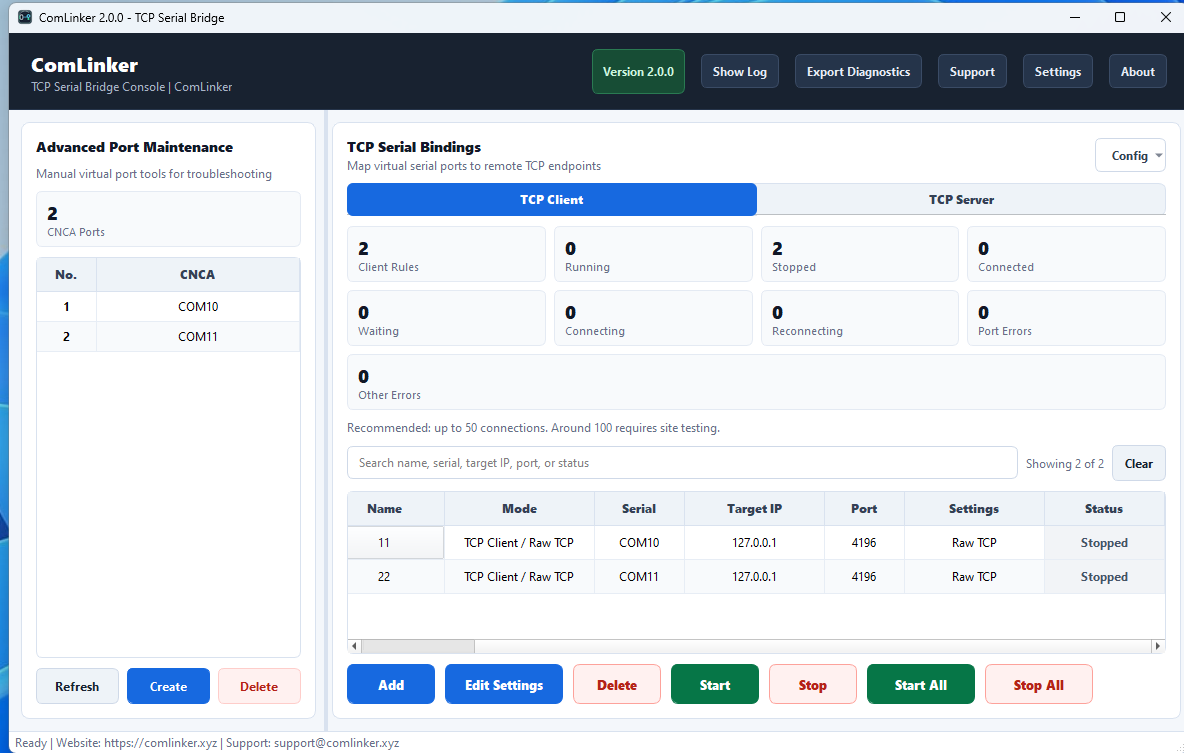
ComLinker dashboard showing TCP serial bindings and virtual COM ports

What many teams actually need

Legacy software often needs a local COM port, while the device is reached through TCP/IP. A practical bridge should make that conversion clear enough for operators and support staff to maintain.

  • Local virtual COM ports for existing Windows software.
  • TCP client rules for remote devices, gateways, meters, PLCs, and DTUs.
  • Clear mapping between COM port, IP address, TCP port, and rule name.

Selection checklist

  • Can it manage multiple TCP to COM bindings on one machine?
  • Does it show connection state without digging through logs?
  • Does it reconnect automatically after network drops?
  • Can configuration be exported for backup or repeat deployment?
  • Is there a trial that can be tested with real equipment first?

Where ComLinker fits

ComLinker focuses on managed TCP to serial bridge workflows for Windows: multiple rules, visible status, auto reconnect, diagnostics export, and one-time workstation licensing.

It is a good fit when the job is to keep existing COM-port software working with TCP/IP devices without rebuilding the original application.

Recommended trial test

  1. Create a virtual COM port.
  2. Bind it to your actual TCP endpoint.
  3. Open that COM port in your existing software.
  4. Restart the target device and confirm reconnect behavior.
  5. Export diagnostics if the setup needs support.

Try ComLinker before buying

Use the 14-day trial to test multi-connection management and reconnect behavior in your own Windows environment.

Download Trial